
Examples#
The examples subdirectory contains a series of examples that can be run to test the functionality
of certain controllers and interfaces. For most examples, you will need to have installed Hercules v2
(see To run examples).
lookup-based_wake_steering_florisstandin#
2-turbine example of lookup-based wake steering control with LookupBasedWakeSteeringController, run using Hercules (v1) with the FLORIS standin in place of AMR-Wind for exposition purposes. To run this example, navigate to the examples/lookup-based_wake_steering_florisstandin folder and then run
bash run_script.sh
You will need to have an up-to-date Hercules installation (possibly on the develop branch) in your
conda environment to run this. You may also need to change permissions to run bash_script.sh as
an executable (chmod +x run_script.sh).
Running the script performs several steps:
It first executes construct_yaw_offsets.py, a python script for generating an optimized set of yaw offsets.
It then uses the constructed yaw offsets to instantiate and run the wake steering simulation.
The time series output is plotted in plot_output_data.py
This should produce the following plot:
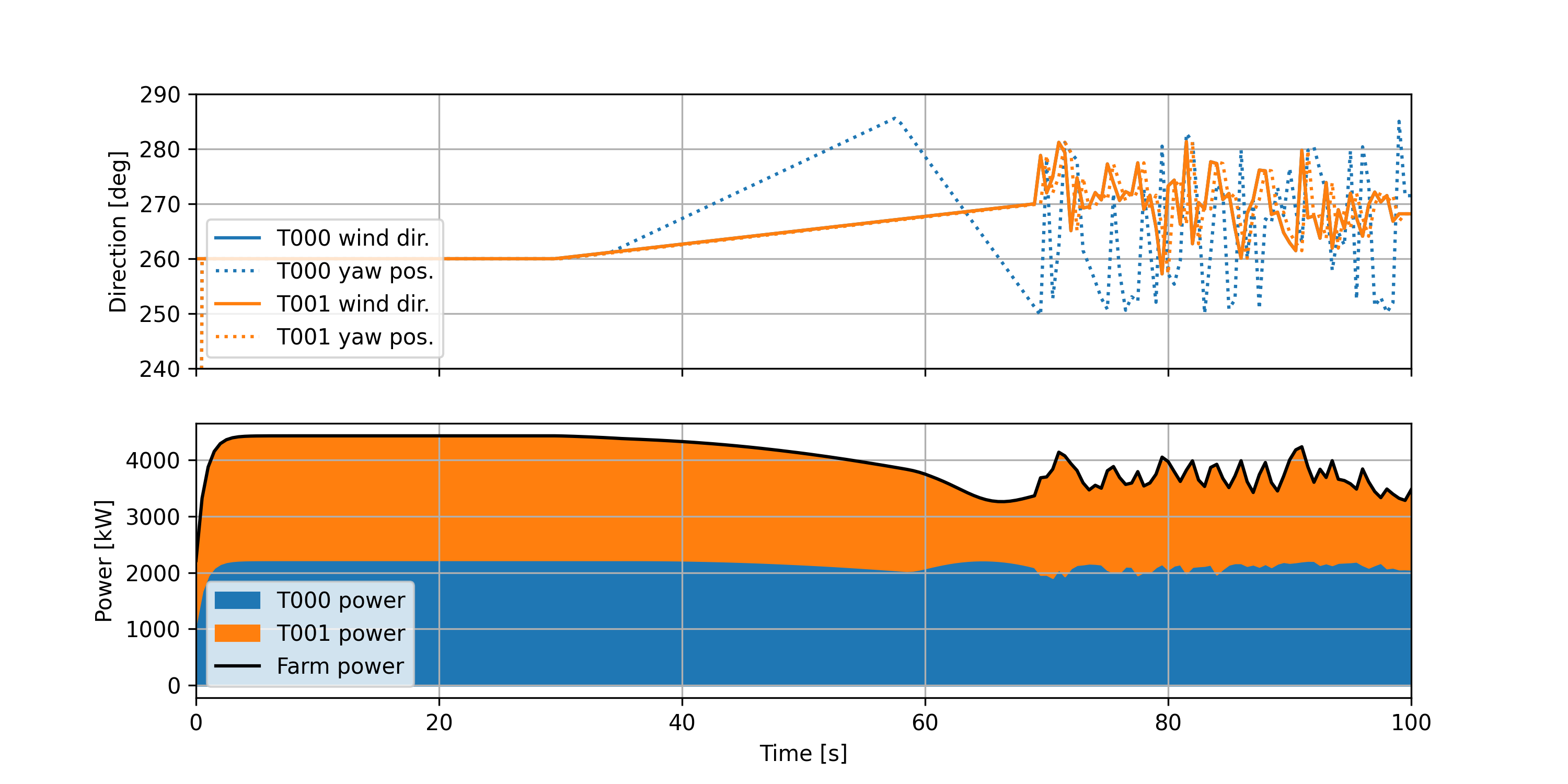
Note that in construct_yaw_offsets.py, the minimum and maximum offset are defined as 25 and -25 degrees, respectively.
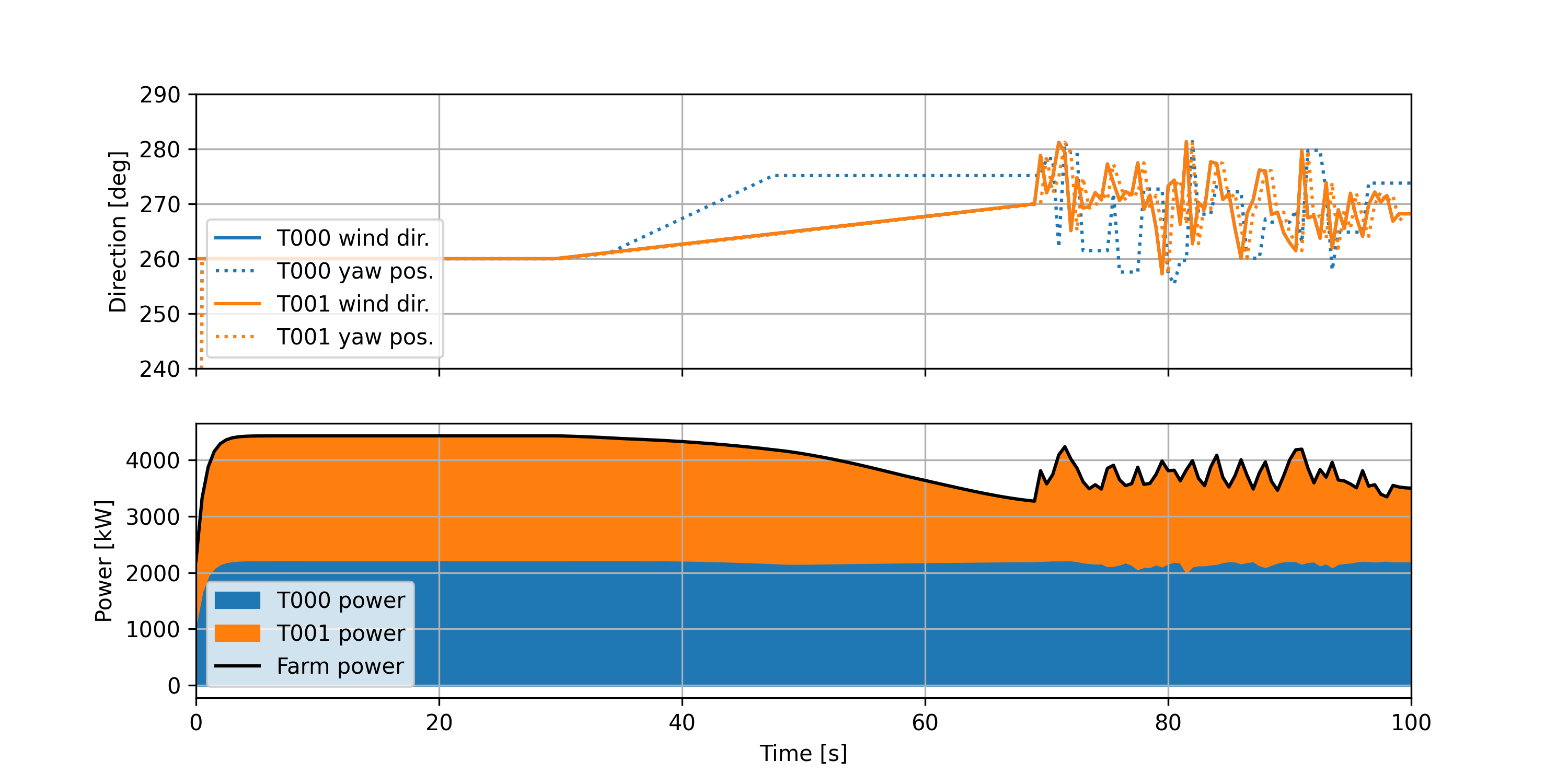
The example can also be run with hysteresis added to the yaw controller to mitigate large yaw
maneuvers near the aligned wind directions. To run with hysteresis, set use_hysteresis = True in
hercules_runscript.py. The simulation then produces the following plot:
Finally, an extra script is provided to compare various options for designing the wake steering look-up tables. This is run using
python compare_yaw_offset_designs.py
and compares the yaw offsets computed using the base approach; adding wind direction uncertainty; applying rate limits to the yaw offsets; and computing offsets for a single wind speed and extending to all operational wind speeds following a simple ramping heuristic.
Note
This example may be temporarily broken due to the recent move from Hercules v1 to v2. We are working to restore full functionality for this example.
wind_farm_power_tracking#
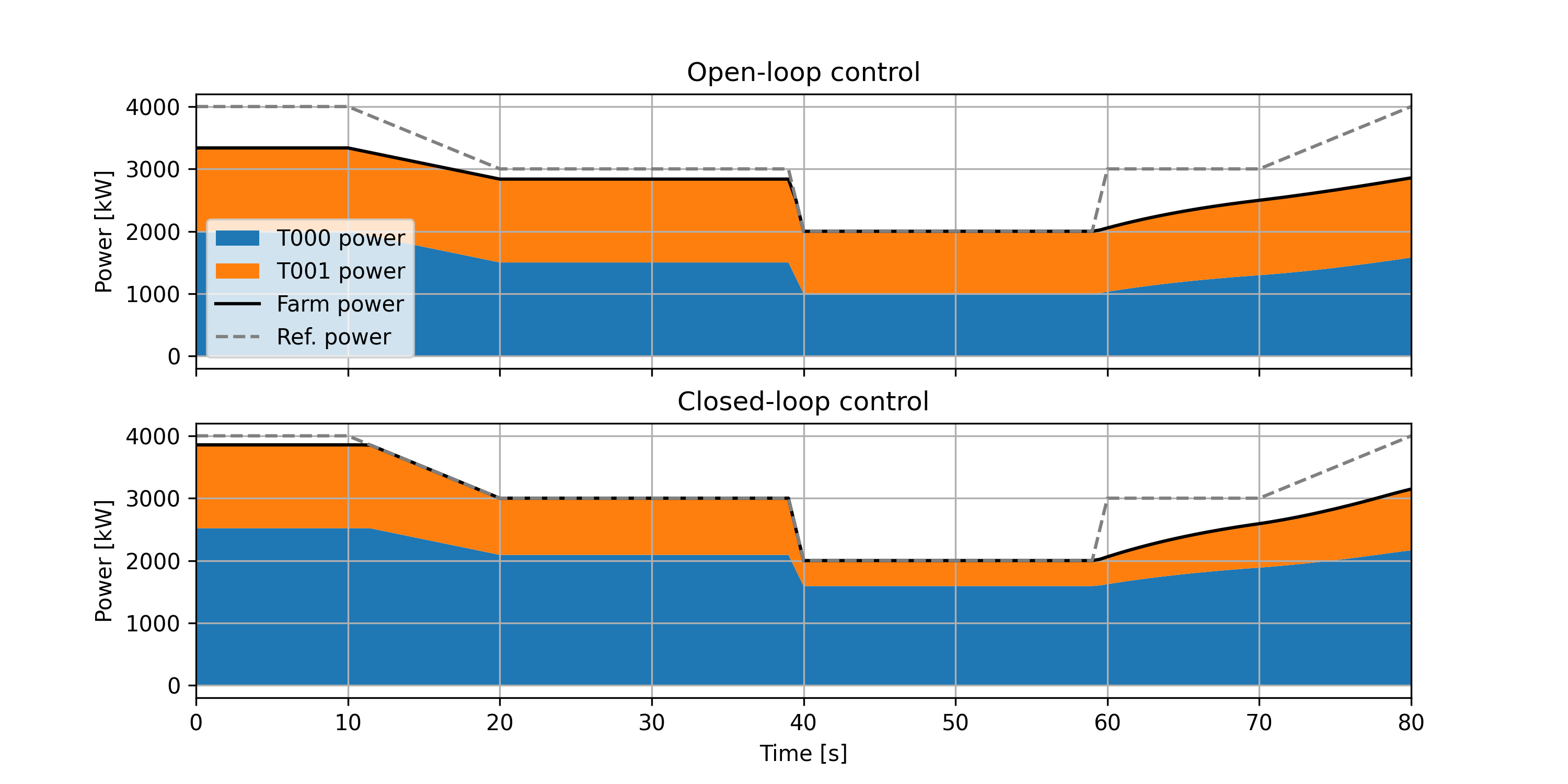
2-turbine example of wind-farm-level power reference tracking with WindFarmPowerTrackingController and WindFarmPowerDistributingController, run using Hercules v2. To run this example, navigate to the examples/wind_farm_power_tracking/ folder and execute the python runscript (runscript.py).
This will run both a closed-loop controller, which compensates for underproduction at individual
turbines, and an open-loop controller, which simply distributes the farm-wide reference evenly
amongst the turbines of the farm without feedback. The resulting trajectories are plotted,
producing:
simple_hybrid_plant#
Example of a wind + solar + battery hybrid power plant using the HybridSupervisoryControllerBaseline to track a steady power reference. The plant comprises 10 NREL 5MW reference wind turbines (50 MW total wind capacity); a 100MW solar PV array; and a 4-hour, 20MW battery (80MWh energy storage capacity).
To run this example, navigate to the examples/simple_hybrid_plant folder and execute the python script runscript.py.
This will run a 2-hour simulation of the plant and controller tracking a steady power
reference. The resulting trajectories are plotted, producing:
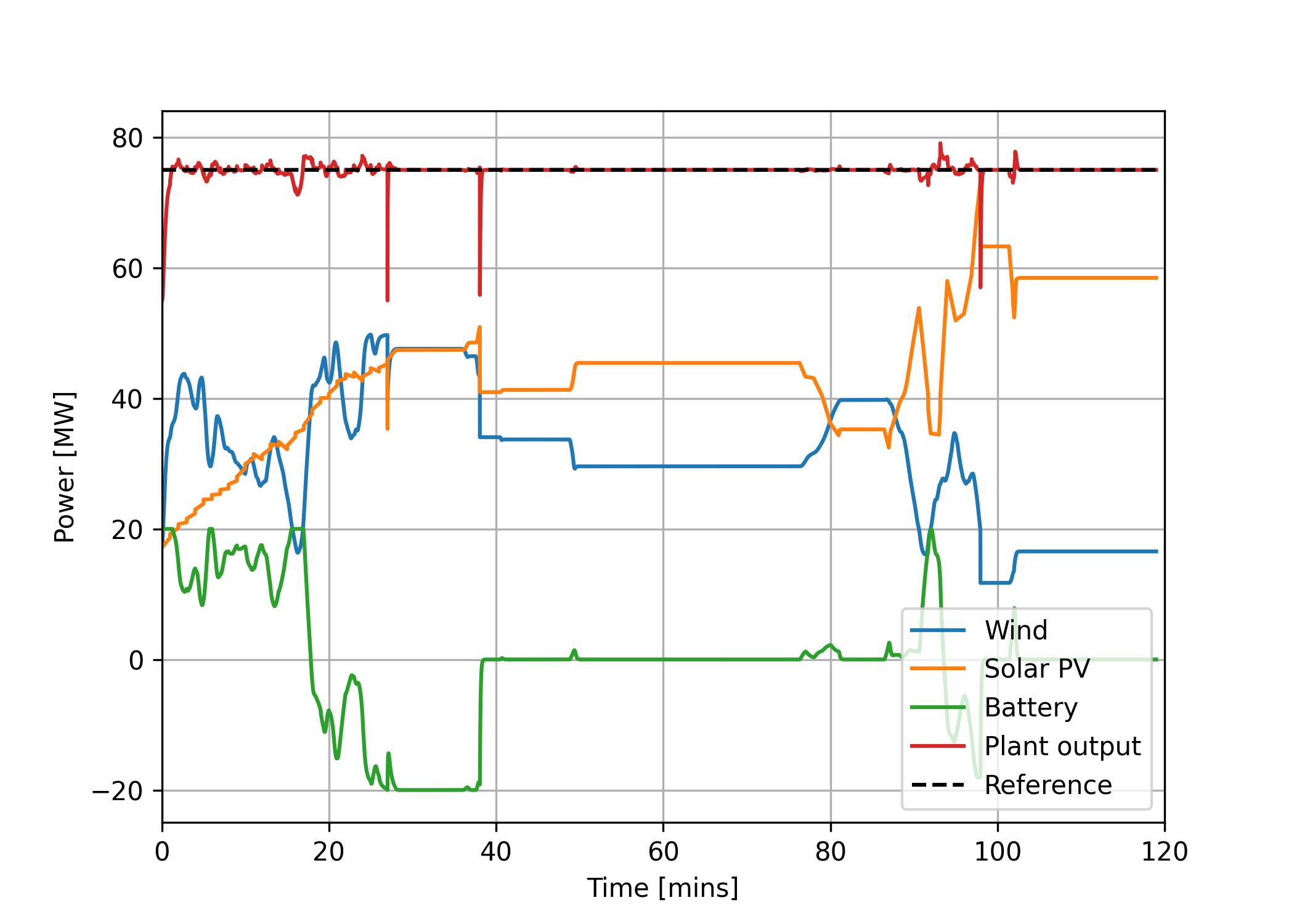
along with some extra plots showing each of the components (wind, solar, and battery) in more detail.
Users may also try switching off the solar or battery components of the hybrid plant by setting
include_solar or include_battery to False in runscript.py.
battery_control_comparison#
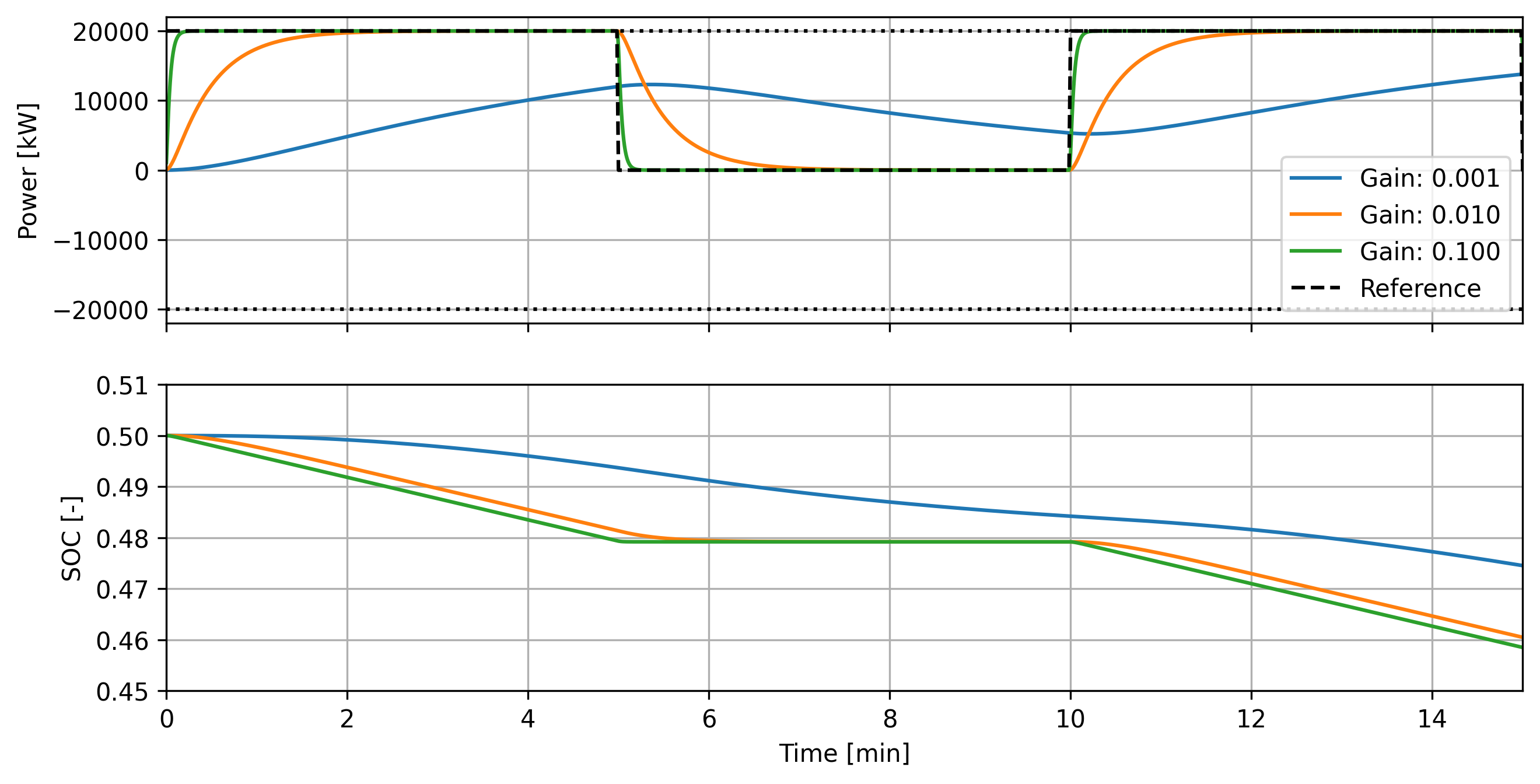
Small demonstration of the effect of different tunings in the BatteryController. This example consists of a simulation run in Hercules comparing different battery control approaches.
The simulation runs a simple battery-only example where the battery is tasked with responding to a square wave power reference signal.
When the battery gain k_batt is increased, the closed-loop system response time decreases, as
shown here (produced by running the standalone_simulation.py script):
Moreover, a clipping_threshold sequence of `[0.1, 0.2, 0.8, 0.9] is used, indicating nullifying
the reference below 10% state of charge (SOC) and above 90% SOC; and linearly ramping the reference
between 10–20% and 80–90%. With this, providing a reference to the controller/battery system
produces a different response based on the initial SOC:
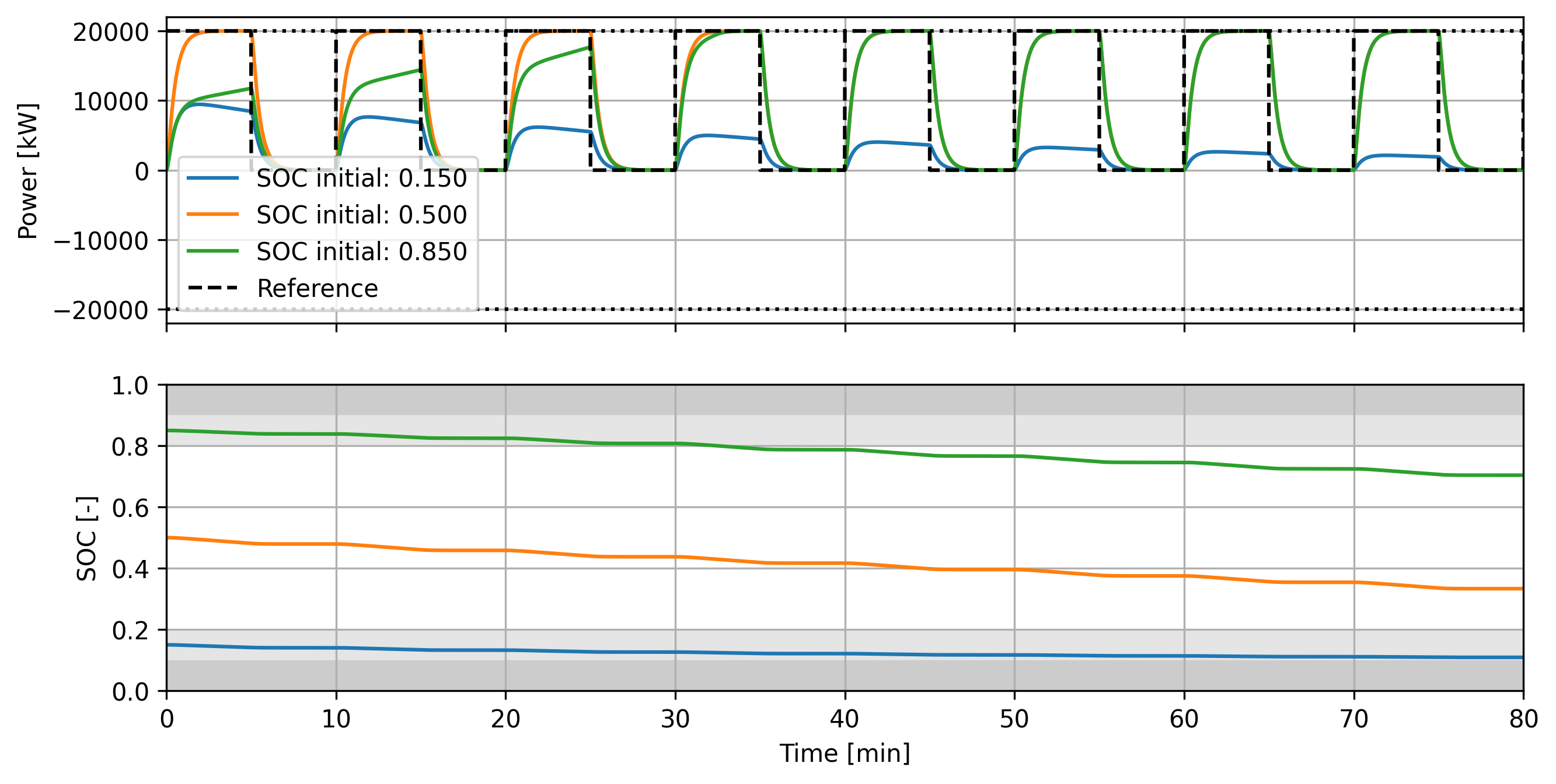 In particular, beginning near 50% SOC results in full reference-tracking behavior; beginning near
85% SOC means that clipping is applied until the SOC leaves the clipped regions indicated in gray;
and beginning near 15% SOC (and continuing to draw down the SOC) means that clipping becomes more
significant as the simulation progresses.
In particular, beginning near 50% SOC results in full reference-tracking behavior; beginning near
85% SOC means that clipping is applied until the SOC leaves the clipped regions indicated in gray;
and beginning near 15% SOC (and continuing to draw down the SOC) means that clipping becomes more
significant as the simulation progresses.
wind_hydrogen_tracking#
Example of wind and hydrogen using Hycon for control is now available in the Hercules repository.
single_turbine_flexible_interconnect#
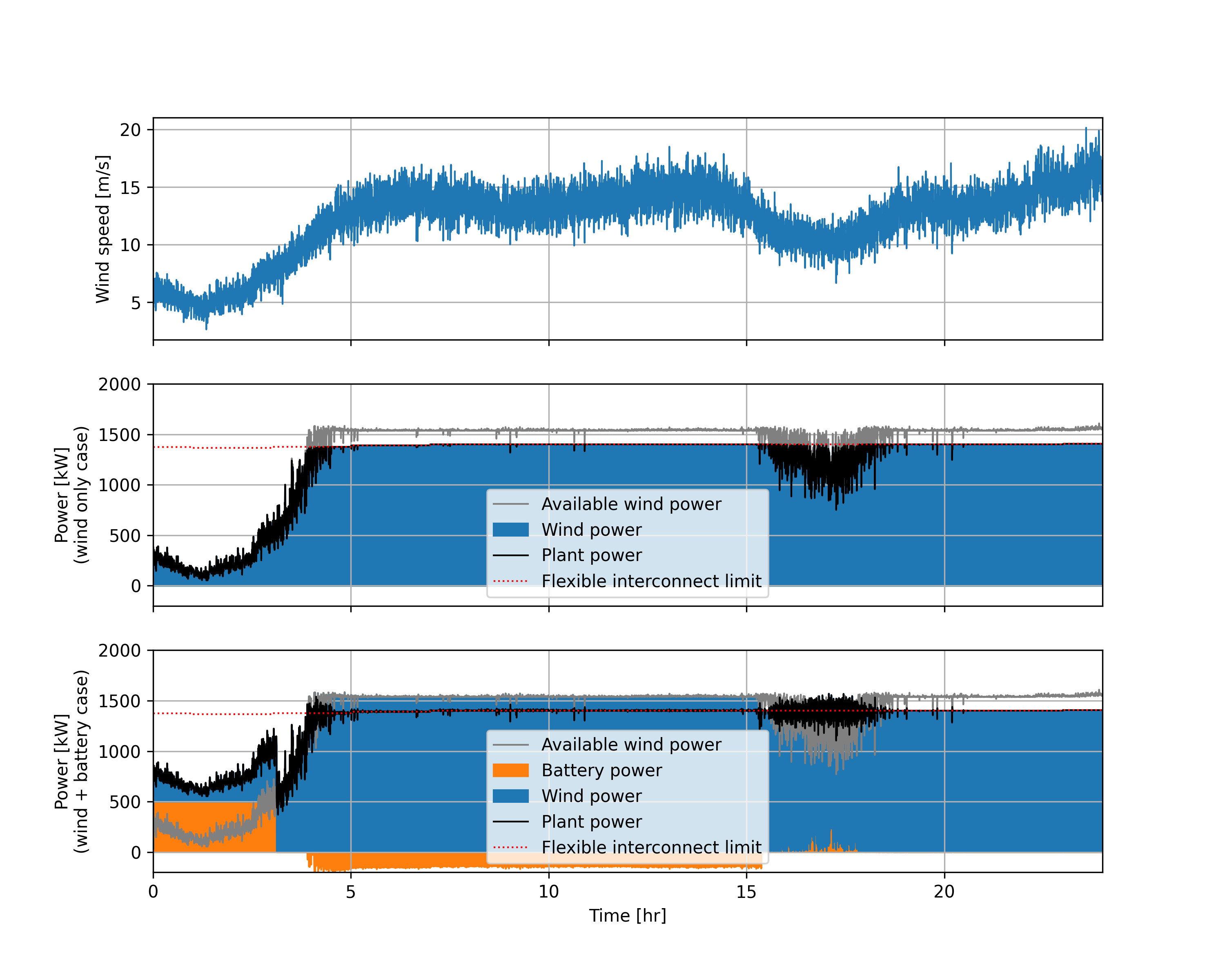
In this example, the a single 1.5MW wind turbine generates power as a distributed power plant but must follow a flexible interconnect amount. The turbine is controlled to generated maximum power under the time-varying interconnect limit, which differs each hour of the day for 24 hours. Then, a 0.5MW, 4-hour battery is added to demonstrate the reduction in curtailed wind energy possible by adding a battery.
The simulation runs over a 24-hour period with 10s time steps, with the turbine and controller tracking a flexible interconnect limit. The wind plus battery case
is also run, and finally a simulation where the wind turbine power output is not constrained by the interconnect, providing a baseline to compute curtailment. The resulting trajectories are plotted, producing:
 as well printing
Results for wind only case
Curtailed energy: 2605.72 kWh (8.2% of available)
Total time curtailed: 19.5 hours

Results for wind + battery case
Curtailed energy: 992.91 kWh (3.1% of available)
Total time curtailed: 8.0 hours
to the console.
The wind speed is low in the first 4 hours or so, and the turbine cannot use its full interconnect allocation. However, since the battery has a nonzero initial state of charge, the battery can make up some of the miss. The wind speed then increases and the full hourly interconnect limit is used. When the available wind exceeds the interconnect limit and the battery is available, the battery charges (shown as a negative battery power). Between hours 15 and 20, the wind speed is fluctuating around 10 m/s and the turbine alone is not fully reaching the interconnect allocation, but during periods of higher wind speeds the interconnect limit is adhered to.
battery_market_revenue_control#
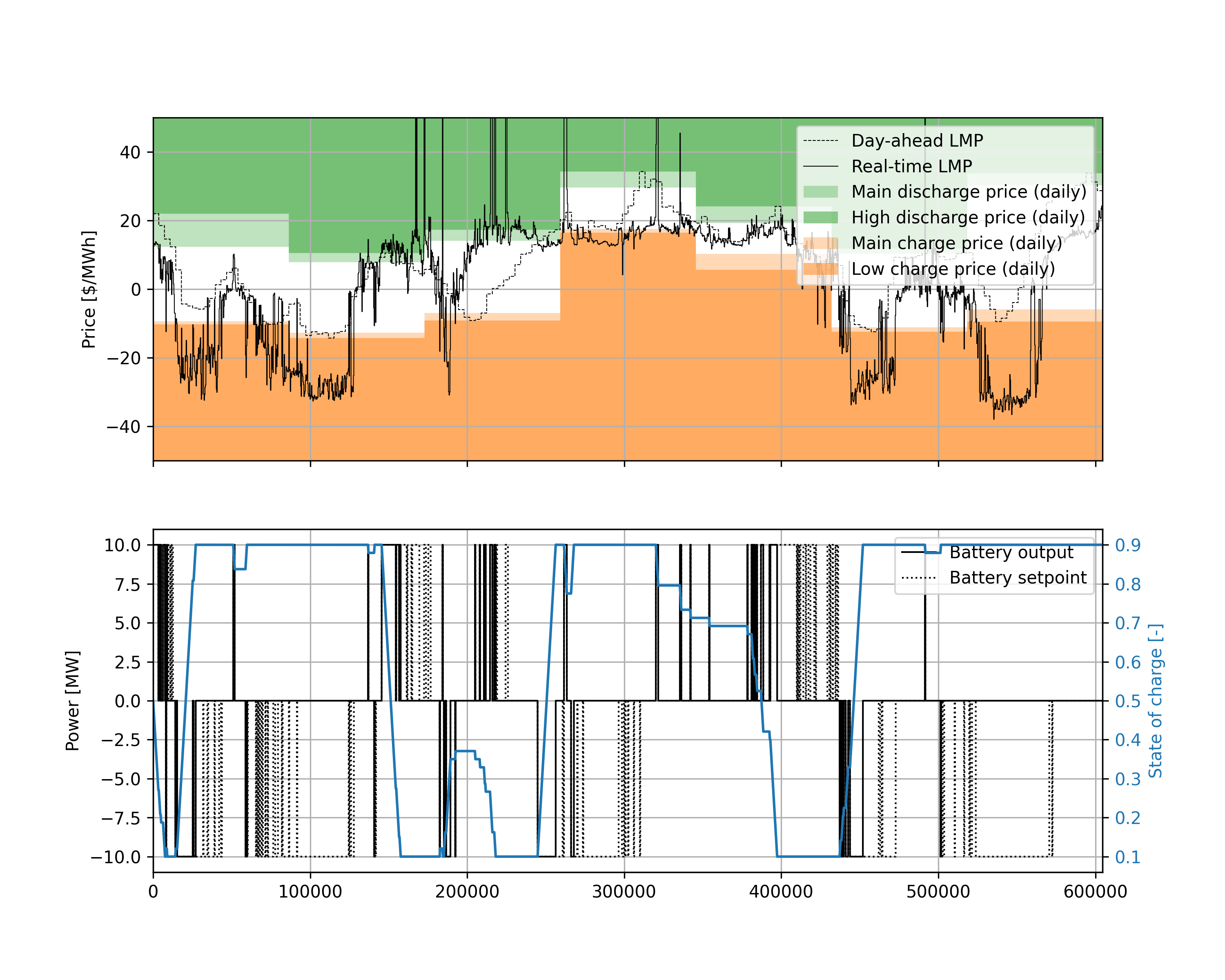
In this example, a 10MW/40MWh battery is controlled to maximize revenue from participation in the real-time energy market, following a strategy of using the day-ahead market to set threshold prices for charging and discharging in the real-time market.
Running the simulation produces the following plot:
 as well printing
Real-time revenue over simulation: $6636.5
to the console.